on
Claude's Dependency Hook
The rise of supply chain attacks done using third party dependencies is a big challenge for developers. This rise has given many folks including myself some paranoia when using Agentic Coding tools like Claude Code.
Fortunately, there are various ways to improve security when using Claude Code. Examples include, sandboxing (/sandbox), various open source projects, DevContainers, or dedicated Virtual Machines. I’ve been experimenting with all these strategies, but each one provides a usability trade off. I began this experiment because tools like Claude Code provide a large array of capabilities through plugins and MCPs, which creates a potential avenue for malicious code execution or accidental installation of compromised packages via hallucinations.
I decided to investigate the various hooks that are leveraged to automate context and identified a an opportunity to do some inline security checks. I wanted to perform automated dependency scanning if Claude decided to install a dependency (e.g., npm install). I had the following criteria
- Run dependency scans without having to prompt Claude every time I need to install package.
- Log every dependency scan.
- Silently succeed on known good dependencies.
- Prompt when there is a suspect or high-risk dependency.
- Use simple TypeScript that can be executed quickly using Bun.
Dependency Scanning Script
I decided to use the socket.dev CLI tool because of its generous free tier. The Socket CLI allows for checking an npm package score based on several properties such as supply chain security, quality, maintenance, vulnerabilities, and licensing.
I wrote a simple TypeScript script to act as a wrapper for the Socket CLI. Using TypeScript allows me to utilize bun to run the hook script with minimal overhead. The script monitors the bash command and uses regex to identify installation commands across npm, yarn, pnpm, and bun. Once the script detects a dependency installation command, it parses out the package name and runs the NPM security check with: socket package score npm <package> --json
  function extractPackageName(command: string): string | null {
    const patterns = [
      /npm\s+(?:install|i|add)\s+([^\s-][^\s]*)/i,
      /yarn\s+add\s+([^\s-][^\s]*)/i,
      /bun\s+add\s+([^\s-][^\s]*)/i,
      /pnpm\s+add\s+([^\s-][^\s]*)/i,
    ];

    for (const pattern of patterns) {
      const match = command.match(pattern);
      if (match) {
        const pkg = match[1];
        // Handle @scope/package@version -> @scope/package
        return pkg.replace(/@[\d.]+.*$/, '').replace(/@latest$/, '');
      }
    }
    return null;
  }
Dependency Evaluation
The script proceeds based on the alert severities found in the JSON response:
| Severity | Decision | Reason |
|---|---|---|
| Critical | deny |
[CRITICAL] Socket.dev found critical issue(s) in package. Installation blocked. |
| High | ask |
[WARNING] Socket.dev found high severity issue(s) in package. Proceed? |
| Low/None | allow |
[SUCCESS] No high-severity alerts. Installation allowed. |
Decisions are output in JSON in Claude Code’s PreToolUse format.
# PreToolUse format reference
{
  "hookSpecificOutput": {
    "hookEventName": "PreToolUse",
    "permissionDecision": "{{DECISION}}",   // deny | ask | allow
    "permissionDecisionReason": "{{REASON}}"
  }
}
For dependencies that have any high alerts, the permissionDecision of deny and permissionDecision of ask is used with an output that would look like this:
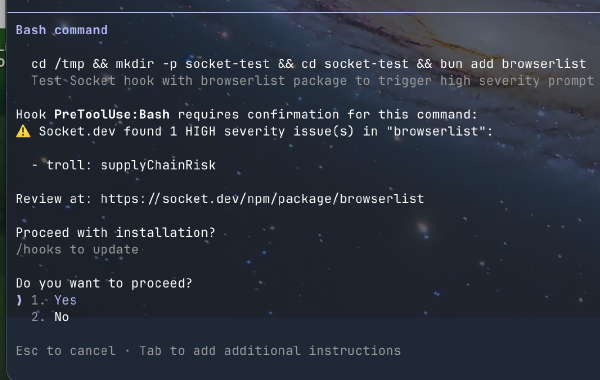
Whenever a package is blocked or allowed, the hook writes a JSON line to a logs/ directory to create a canonical record of the attempt. This is an example of a high severity warning:
{
  "timestamp": "2026-01-21T12:35:19.567Z",
  "session_id": "test-session",
  "event_type": "warn",
  "tool": "Bash",
  "package": "browserlist",
  "alerts": [
    {
      "name": "troll",
      "severity": "high",
      "category": "supplyChainRisk",
      "example": "npm/[email protected]"
    }
  ],
  "reason": "High severity issues detected",
  "action_taken": "Warned user, allowed installation"
}
Under the Hood
The implementation itself is pretty simple, but I added a few guardrails to keep it from becoming a nuisance:
First, the script fails open. If the Socket CLI isn’t installed or the network times out, it just allows the install to proceed. I didn’t want a Socket API outage to keep Claude from vibin'.
The regex handles the following situations: stripping version specifiers like @latest or @4.0.0, and correctly parsing scoped packages like @scope/pkg. Nothing fancy, but it keeps the lookups accurate.
Finally, since Claude picks a package manager based on whatever lockfile exists in the project, the hook treats npm, yarn, pnpm, and bun the same way.
Claude Hook Setup
The settings.json file was modified to run on all preToolUse events whenever Claude utilizes the Bash tool. I found it much more reliable to pass all Bash commands to the TypeScript wrapper and handle the logic there rather than trying to filter via regex in the settings file itself.
{
  "hooks": {
    "preToolUse": [
      {
        "matcher": "Bash",
        "command": "bun ~/.claude/hooks/SocketDependencyCheck.hook.ts"
      }
    ]
  }
}
This solution was intended to be more of a learning experience and can certainly be improved in many ways, such as handling bulk installations or caching results to improve performance. Using simple TypeScript scripts that can be invoked with bun in the proper context can be extremely useful to provide a more seamless Claude Code experience.
The SocketDependencyCheck Hook can be found here. Ensure the hook is added to Claude’s settings.json